

Lancez-vous avec la nouvelle application Secret View en quelques étapes seulement
9/9/2026
L'application Secret View est désormais disponible ! Grâce à elle, vous pouvez trouver plus rapidement les missions qui vous correspondent, préparer vos visites en toute simplicité et remplir vos enquêtes avec plus d'efficacité. Dans cet article, nous vous montrons en 7 étapes comment tirer le meilleur parti de vos missions avec l'application.
1. Trouvez vos missions plus rapidement
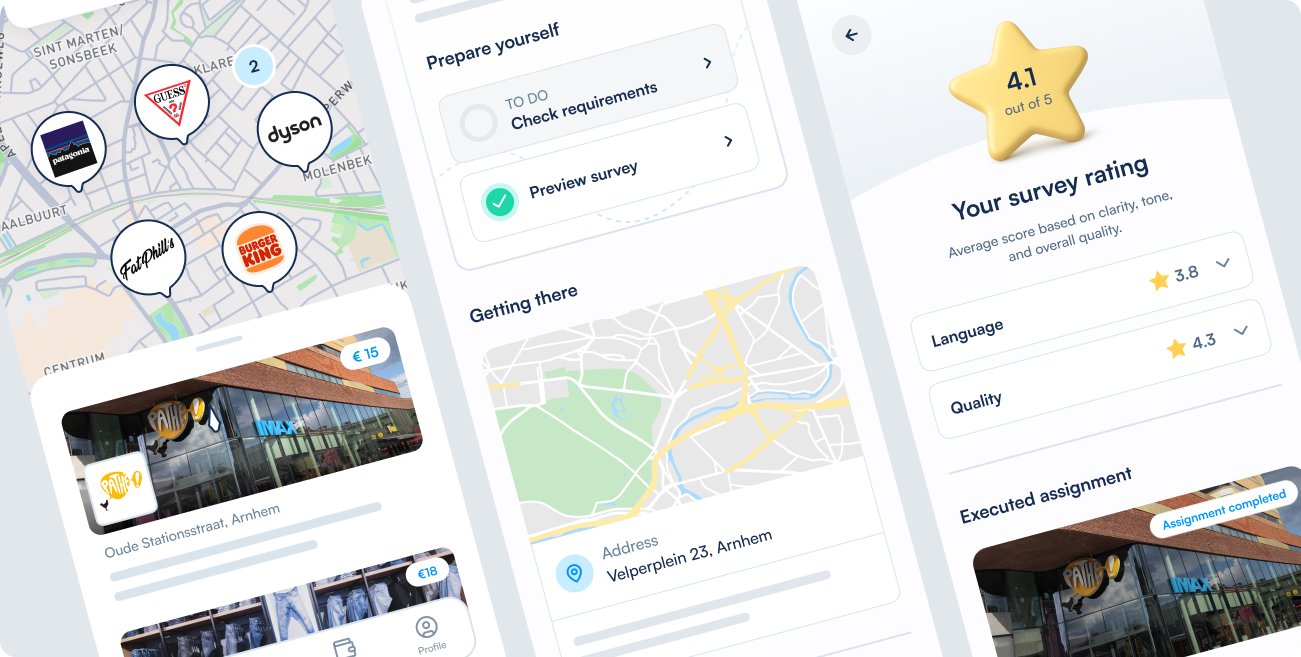
Ouvrez l'application et connectez-vous comme d'habitude. Vous serez redirigé directement vers la page Découvrir , où vous verrez les missions correspondant à votre localisation et à vos centres d'intérêt. Bien entendu, vous pouvez également effectuer vos propres recherches. Utilisez par exemple la carte pour voir quelles missions sont disponibles près de chez vous. Grâce aux filtres, vous pouvez facilement sélectionner les types de missions qui correspondent le mieux à vos attentes.
Conseil : activez les services de localisation et les notifications de l'application pour être parmi les premiers informés des nouvelles missions près de chez vous ! 🙌
2. Visualisez tous les détails de vos missions en un coup d'œil
Vous avez trouvé une mission intéressante ? Ouvrez-la pour consulter toutes les informations importantes en un coup d'œil.
Vous y trouverez notamment :
- ce que vous devrez faire durant la visite
- les points auxquels vous devrez prêter attention
- la période durant laquelle vous pouvez réaliser la mission
- le budget ou la rémunération que vous recevrez
Cela facilite le choix d'une mission adaptée à vos besoins et vous donne une idée encore plus précise de ce qui vous attend.
3. Certaines missions peuvent être réservées instantanément
Lors de votre inscription, vous choisissez immédiatement la date à laquelle vous souhaitez réaliser la mission.
Vous choisissez une date marquée d'un « ⚡️ » ? La mission vous est attribuée instantanément. Plus besoin d'attendre une sélection.
Vous choisissez une date plus éloignée ? Vous serez inscrit au tirage au sort. Vous recevrez une notification dès que nous saurons si la mission vous a été attribuée. N'oubliez donc pas d'activer les notifications dans l'application.
4. Consultez vos missions en cours et à venir
Sous Mes missions, vous trouverez toutes les missions auxquelles vous vous êtes inscrit.
Vous pouvez y consulter :
- les missions qui vous ont été attribuées
- les missions pour lesquelles vous êtes encore en attente de tirage au sort
- les missions à venir prochainement
Depuis cet aperçu, vous pouvez accéder à toutes les informations nécessaires pour préparer et réaliser votre visite.
5. Remplissez le questionnaire dans l'application
Remplir les questionnaires est désormais encore plus simple. Toutes les pièces jointes requises lors d'une mission, comme une photo du magasin ou votre reçu, peuvent maintenant être prises et téléchargées directement dans l'application. Bien entendu, notre plateforme web reste également disponible !
Veuillez noter : vous ne pouvez plus télécharger ces photos depuis votre appareil ultérieurement. Vous devrez les prendre directement dans l'application pendant la mission. Ainsi, vous pouvez voir toutes les exigences importantes en un coup d'œil et risquez moins d'oublier une étape nécessaire.
Vous avez ajouté toutes les photos et pièces jointes requises ? Vous pouvez ensuite poursuivre le reste du questionnaire, qui peut également être rempli rapidement et facilement dans l'application.
6. Consultez vos paiements dans votre Portefeuille
Sous Portefeuille, vous trouverez votre solde et vos paiements. Vous pouvez voir quels montants vous sont encore dus et quels paiements ont déjà été traités.
7. Gérez votre profil et invitez des amis !
Sous Profil, vous pouvez mettre à jour vos informations personnelles et vos paramètres. Vous y trouverez également les évaluations de vos enquêtes terminées.
Vous pouvez également utiliser Inviter et gagner pour inviter des amis à réaliser une mission. S'ils s'inscrivent et terminent la mission avec succès, vous recevrez une récompense supplémentaire.
Partagez votre avis
Vous avez une question, quelque chose ne fonctionne pas comme prévu ou vous avez une idée pour l'application ? Faites-le nous savoir. Vos retours nous aident à continuer d'améliorer l'application Secret View.
Téléchargez l'application, connectez-vous et découvrez les missions disponibles près de chez vous.



.jpg)